Training a Custom Quadruped from Scratch in Isaac Lab
A short, opinionated walkthrough. From an empty machine to a 12-DoF robot that learns to step. Reference robot: ZHAW Wild V1. Things that differ from the NVIDIA examples are flagged inline.
Contents
1 Sim vs. Lab, in plain words
The two names confuse everyone. Here is the short version.
| Tool | What it is | You touch it when |
|---|---|---|
| Isaac Sim | The simulator. PhysX physics engine plus a USD scene graph plus a Python API. | You want a 3D world with gravity, collisions, lights, cameras. |
| Isaac Lab | A framework on top of Isaac Sim, focused on RL training. Manager-based environments, vectorised envs, reward terms, terrain generators. | You want to train a policy. You almost never script Isaac Sim by hand once you use Lab. |
| rsl_rl | The PPO trainer that ships with Isaac Lab. Other choices: rl_games, skrl. PPO is the default for locomotion. | You hit train.py. |
Mental model if you come from web dev: Isaac Sim is the renderer plus physics. Isaac Lab is the game framework that wires up player input, scoring, level reset, and parallel instances. PPO is the agent that figures out the controls.
2 Install on Windows
The clean path that worked here is the pip install of Isaac Sim plus Isaac Lab from source, all in one Python 3.11 venv. No Docker, no Visual Studio, no source build of Sim. Big install, but reproducible.
What lives where
Isaac Lab repo : C:\Users\jaha\robotic\IsaacLab
Virtual env    : C:\Users\jaha\env_isaaclab
Python         : 3.11
Isaac Sim      : 5.1.0
torch          : 2.7.0+cu128
The five commands that matter
py -3.11 -m venv C:\Users\jaha\env_isaaclab
git clone https://github.com/isaac-sim/IsaacLab.git C:\Users\jaha\robotic\IsaacLab

C:\Users\jaha\env_isaaclab\Scripts\python.exe -m pip install ^
  "isaacsim[all,extscache]==5.1.0" --extra-index-url https://pypi.nvidia.com

C:\Users\jaha\env_isaaclab\Scripts\python.exe -m pip install -U ^
  torch==2.7.0 torchvision==0.22.0 torchaudio==2.7.0 ^
  --index-url https://download.pytorch.org/whl/cu128

cd C:\Users\jaha\robotic\IsaacLab
.\isaaclab.bat -i
C:\Users\jaha\ or enable long paths.
Deeply nested install paths break the cache extractor without a useful error.
$env:VAR = "value", not set VAR=value. The line continuation char is a backtick, not a caret.
3 First examples to run
Before touching your own robot, run two NVIDIA examples to confirm the install.
All three scripts below ship with Isaac Lab and live in the cloned repo under IsaacLab/scripts/.
stock isaac lab
Spawn a primitive
cd C:\Users\jaha\robotic\IsaacLab
C:\Users\jaha\env_isaaclab\Scripts\python.exe scripts\tutorials\00_sim\spawn_prims.py
A box appears in a scene. Read the script top to bottom. This is your scene.add(mesh) equivalent.
Drive an articulation
C:\Users\jaha\env_isaaclab\Scripts\python.exe scripts\tutorials\01_assets\run_articulation.py
A robot appears, joints driven by code. The class to look for is ArticulationAction. Joints are the things RL will eventually control.
Train a built-in robot, end to end
C:\Users\jaha\env_isaaclab\Scripts\python.exe scripts\reinforcement_learning\rsl_rl\train.py ^
  --task=Isaac-Velocity-Rough-Anymal-C-v0 --headless
This trains Anymal-C on rough terrain. If the terminal prints rising mean rewards, the install is healthy.
You can interrupt at any point and play the latest checkpoint with play.py.
4 Designing in Fusion 360
Fusion is great for building the body. It is bad at exporting it. Plan for both phases.
Build it as components, not bodies
Each link must be its own Component. Bodies inside one component become a single rigid link in URDF,
which is almost never what you want. For the four legs of ZHAW Wild, use prefixes fl_, fr_,
rl_, rr_ on every component name. You will love yourself in three hours.
Joint discipline
- Revolute for hips and knees. Always set joint limits in Fusion. URDF inherits them.
- Rigid for fixed connections. Cheaper than fixed joints in URDF.
- Avoid continuous unless you really mean unbounded rotation. Wheels yes, hips no.
- For copied legs, use Make Independent on the components. Otherwise both legs share one joint and the URDF will be mysterious.
Three things to set before export
- Set the world origin sensibly. The base link will sit at this origin.
- Apply real materials so mass and inertia are not zero. Steel is rarely correct for hobby parts. Use ABS or aluminum.
- Pre-orient the robot to Z-up if your exporter offers it. Otherwise you fix this later in code.
base_link → 4 × (hip_link, thigh_link,
shank_link, foot_link). Three rotational joints per leg: haa, hfe, kfe.
That is the Spot and Anymal convention, which means RL configs from those robots transfer cleanly.
5 Exporting to URDF
Fusion has no native URDF export. Use the ACDC4Robot
add-in. It writes URDF in the Gazebo flavor, which is identical to what Isaac Lab consumes.
Three tabs to set: choose URDF as the format, pick an output folder, click run. The add-in walks the
component tree and emits one <link> per component plus one <joint> per Fusion joint.
Why URDF, not the USD that Fusion can spit out
A USD exported straight from CAD looks fine in a viewer and silently fails in Isaac Lab. The same three sins show up every time:
- No
ArticulationRootAPIon the root prim. Isaac Lab does not see a robot, only a bag of Xforms. - Loose nested Xform hierarchy like
/World/asm/asm/...because every assembly layer becomes its own group. - Auto-generated joint names stitched together from the connected components, for example
revolute_joint_body_uleg_fl. They work mechanically, but no regex you write will be readable.
The fix is the same every time: regenerate URDF, hand that to Isaac Lab, and let Lab bake a compliant USD itself.
Isaac Lab adds the ArticulationRootAPI, contact-reporting hooks, and inertial tensors during conversion.
Going through URDF is the only path that gives you these for free.
What to fix in the URDF after export
- Joint type. ACDC4Robot sometimes emits
continuousfor joints you defined as revolute. Open the file, search fortype="continuous", replace withtype="revolute", and add<limit lower="..." upper="..."/>. - Y-up vs Z-up. Most CAD exports are Y-up. Isaac is Z-up. Either rotate the robot in Fusion before export, or apply a
+90°rotation ininit_state.rotlater. Quaternion(w, x, y, z) = (0.7071, 0.7071, 0, 0). - Mass and inertia. Confirm none are zero. Easiest check: load the URDF, run a step, watch if the robot collapses sensibly under gravity. A truly massless link is silent and weird.
- Mesh paths. URDF uses
package://paths in ROS land. Isaac Lab is happy with relativefile://paths or plain relative paths. Keep meshes next to the URDF.
revolute_joint_body_uleg_fl,
every single regex in your actuator config and reward config has to match that. The Spot pattern of
fl_haa, fl_hfe, fl_kfe matches a one-line regex like ".*_hfe".
Worth a 10-minute rename pass right after export.
6 Loading into Isaac Lab
Two files own the robot side: an asset config and a task registration. For ZHAW Wild they sit at:
IsaacLab\source\isaaclab_assets\isaaclab_assets\robots\zhawild.py
IsaacLab\source\isaaclab_tasks\...\velocity\config\zhawild\__init__.py
IsaacLab\source\isaaclab_tasks\...\velocity\config\zhawild\flat_env_cfg.py
Open the live files: zhawild.py (asset) · __init__.py (task registration) · flat_env_cfg.py (env) · rsl_rl_ppo_cfg.py (PPO).
The asset config view full file
ZHAWILD_CFG = ArticulationCfg(
    spawn=sim_utils.UrdfFileCfg(
        asset_path="path/to/quadruped_zhawild_v1/quadruped2.urdf",
        rigid_props=...,
        articulation_props=...,
    ),
    init_state=ArticulationCfg.InitialStateCfg(
        pos=(0.0, 0.0, 0.75),
        rot=(0.7071068, 0.7071068, 0.0, 0.0),    # Y-up to Z-up
        joint_pos={".*": 0.0},
    ),
    actuators={
        "legs": ImplicitActuatorCfg(
            joint_names_expr=[".*_haa", ".*_hfe", ".*_kfe"],
            stiffness=80.0, damping=2.0,
        ),
    },
)
The viewer parses the same STL meshes Isaac Lab loads, in the same joint hierarchy. Drag the sliders to drive
the hfe (hip flexion) and kfe (knee) joints across all four legs.
Source: quadruped2.urdf +
11 STL meshes.
Why URDF is passed in, not USD
Isaac Lab attaches contact-reporting APIs to the foot links during URDF conversion. That is what makes the gait, air-time, slip, and body-contact reward terms work. If you pre-convert to USD outside the loop, you skip that step and your foot contacts will be empty. Pass the URDF, let Lab convert it once, cache it.
continuous joints meant to
spin freely. If they sit on a stiff position-PD with target zero, the robot fights its own rolling motion.
The fix is two groups: legs with normal gains, and wheels with stiffness=0
plus light damping. ZHAW Wild has no wheels, so one actuator group is enough.
7 Building the training environment
An Isaac Lab env is a Python class made of seven configs. Read this once, then it is just lego.
| Config | What it defines | Game-dev analogue |
|---|---|---|
SceneCfg | Ground, lights, robot, sensors. | The level. |
CommandsCfg | Target velocity vector resampled every N seconds. | The joystick input. |
ActionsCfg | What the policy outputs. Usually joint position targets. | The buttons. |
ObservationsCfg | Input tensor: base velocity, gravity vector, joint state, last action, optional height scan. | What the player sees. |
RewardsCfg | Plus and minus terms accumulated every step. | The scoring. |
TerminationsCfg | When to end the episode and respawn. | Game over. |
EventCfg | Domain randomisation: friction, mass, push events. | Random chaos so it generalises. |
The simulation loop, end to end
One iteration of the inner loop is one physics tick across all 1024 parallel envs. PPO collects 24 ticks per env, runs a gradient update, and starts the next iteration. That is the heartbeat.
Terrain
Isaac Lab ships a procedural terrain generator. Three shapes you actually want:
- Flat plane. Use it for early training and for clean playback. Anything weird you see is the policy, not the floor.
- Rough terrain. Bumpy heightmap. Forces the policy to handle uneven contact, which is most of the value of training in sim.
- Stairs and gaps. Optional. Useful only if your reward and observation include height-scan info.
Obstacles
Movable obstacles are just rigid bodies you spawn into the scene with collision and mass. Boxes and cylinders work fine. They are not part of the policy observation, the robot just bumps into them. Useful for stress testing and for the kick-disturbance scenario described later.
Domain randomisation
The single thing that makes a sim-trained policy survive in the real world. In ZHAW Wild we randomise:
- Static and dynamic friction at the foot per env.
- Base mass within ±10 percent.
- A small velocity push every 10 to 15 seconds, drawn from a square in the xy plane.
Each parallel env gets a different draw. With 1024 envs, the policy sees thousands of variations every minute.
8 Reward shaping & the crawl trap
PPO does exactly what your reward function says, never what you meant. This was the most expensive lesson of the whole project. On Robot20, our 2-DoF custom robot, 15 hours of GPU time produced a policy that maximised every term we wrote, while crawling on its lower-leg shins like skis. No standing, no foot clearance, healthy gait reward, full speed reward.
Three failures that compound
- Gait reward checks alternation, not posture. A crawling robot with alternating shin contact also satisfies it. Combine the gait term with a base-height target.
- Termination only on torso and thigh. The lower-leg segment was supposed to be the foot. Lying flat on it was perfectly legal. Add bottom-link termination, or a strong slip penalty when the bottom is in flat contact.
- Geometry locks you in. A 2-joint leg has no abduction and no ankle. Standing is hard, crawling is easy. No reward function can overcome that. ZHAW Wild with its three rotational DoF per leg does not have this problem.
Reward terms that work for a classical quadruped
| Term | Sign | Reads as |
|---|---|---|
| track_lin_vel_xy_exp | +1.0 | Match the commanded forward speed. Main objective. |
| track_ang_vel_z_exp | +0.5 | Match the commanded turn rate. |
| feet_air_time | +0.125 | Lift feet off the ground. Encourages stepping over sliding. |
| lin_vel_z_l2 | −2.0 | Do not bounce vertically. |
| ang_vel_xy_l2 | −0.05 | Do not wobble. |
| action_rate_l2 | −0.01 | Do not jerk joints around. |
| undesired_contacts | −1.0 | Do not touch ground with thighs or torso. |
A second example from this run · the bunny hop recording · 9 s
Why it hops & what would fix it
The bunny-hop is the exact same kind of reward exploit as the crawl, just one rung higher. The policy satisfies every term we wrote without any of the things that make a gait look right.
| Why it works for PPO | What it tells us is missing |
|---|---|
| Velocity reward only checks the base. Hopping forward at 0.5 m/s scores the same as walking forward at 0.5 m/s. | Add a foot-contact-time term that rewards at least N feet on the ground at any time. Hopping has 0 ground contacts mid-flight. |
| Gait reward checks alternation per pair. Synchronised four-foot lift-off looks like alternation just with phase 0 between pairs. | Penalise contact-pattern symmetry across diagonals. A trot has fl+rr down while fr+rl swing. A hop has all four matched. |
Vertical-velocity penalty lin_vel_z_l2 exists but the weight is small (-2.0 against a +1.0 forward reward). At training time it gets paid like a tax. |
Bump vertical-velocity penalty, or add a base-height tracking term (target ~0.55 m, hard-clip the deviation). |
| Action-rate penalty is per-step. Hopping uses one big synchronised extension followed by relaxation. Few action transitions per second. | Add an air-time-per-foot term that rewards individual feet being in the air briefly, not all four at once. |
In short: the policy has no incentive to stagger the legs. Every reward we wrote is satisfiable by a
perfectly in-phase bounce. Adding a single "never less than two feet on the ground" contact constraint,
either as a hard penalty or a contact-schedule reward, breaks the hop and forces a real trot. NVIDIA's Anymal
and Spot configs do this with a feet_air_time term tuned per-foot and a flat_orientation_l2
term that punishes the pitch wobble that a hop produces on landing.
9 Running PPO & reading the log
train.py and play.py ship with Isaac Lab. stock isaac lab
The custom piece is the task ID Isaac-Velocity-Flat-ZHAWild-v0, which gets registered when our
zhawild_task package is on the import path.
Train
cd C:\Users\jaha\robotic\IsaacLab
C:\Users\jaha\env_isaaclab\Scripts\python.exe ^
  scripts\reinforcement_learning\rsl_rl\train.py ^
  --task=Isaac-Velocity-Flat-ZHAWild-v0 --headless --num_envs=1024
Play a checkpoint
C:\Users\jaha\env_isaaclab\Scripts\python.exe ^
  scripts\reinforcement_learning\rsl_rl\play.py ^
  --task=Isaac-Velocity-Flat-ZHAWild-Play-v0 --num_envs=1 --real-time ^
  --checkpoint logs\rsl_rl\zhawild_flat\2026-04-26_17-46-09\model_1500.pt
Five numbers to watch
| Metric | What it means | Healthy direction |
|---|---|---|
| Mean reward | Sum of all terms, averaged across envs and steps. | Climbs, then plateaus. Absolute number is meaningless across reward configs. |
| Mean episode length | Steps survived before fall or timeout. | Climbs toward 1000 (the 20-second cap). |
| Body-contact fraction | Episodes that ended because torso or thigh hit the floor. | Drops toward zero. This is balance. |
| Mean noise std | Exploration noise on the action distribution. | Shrinks slowly. Stays positive. |
| Value-function loss | Critic fit quality. | Stable. Sudden growth is a divergence warning. |
For ZHAW Wild, after 2 h 11 min and 37 M timesteps, mean reward went from 0.9 to 48.7, episode length from 14 to 292, body-contact from 100 percent to 73 percent. The policy is learning. It still falls in three out of four episodes. That is the next training target.
The numbers run 2026-04-26_17-46-09
| Iter | Reward | Ep len | Timeout | Body-cont | XY err | Yaw err | Std | Gait | Lin-vel | Orient |
|---|---|---|---|---|---|---|---|---|---|---|
| 0 | 0.89 | 14 | 0.00 | 0.43 | 0.03 | 0.02 | 0.60 | 0.04 | 0.02 | −0.03 |
| 50 | 1.37 | 18 | 0.00 | 1.00 | 0.05 | 0.03 | 0.42 | 0.06 | 0.03 | −0.05 |
| 100 | 1.90 | 22 | 0.00 | 1.00 | 0.06 | 0.04 | 0.36 | 0.06 | 0.04 | −0.07 |
| 500 | 42.53 | 251 | 0.20 | 0.80 | 0.50 | 0.39 | 0.19 | 1.67 | 0.56 | −0.76 |
| 1000 | 37.24 | 221 | 0.28 | 0.72 | 0.42 | 0.32 | 0.14 | 1.55 | 0.47 | −0.64 |
| 1500 | 48.70 | 292 | 0.27 | 0.73 | 0.54 | 0.55 | 0.12 | 2.39 | 0.77 | −0.95 |
| 1510 | 43.45 | 261 | 0.27 | 0.73 | 0.39 | 0.32 | 0.12 | 1.47 | 0.46 | −0.60 |
Highlighted row: the checkpoint model_1500.pt shown in the kick video below.
The last row is the final iteration before the run was stopped, slightly worse than 1500. That is why we never replay the last checkpoint.
Charts
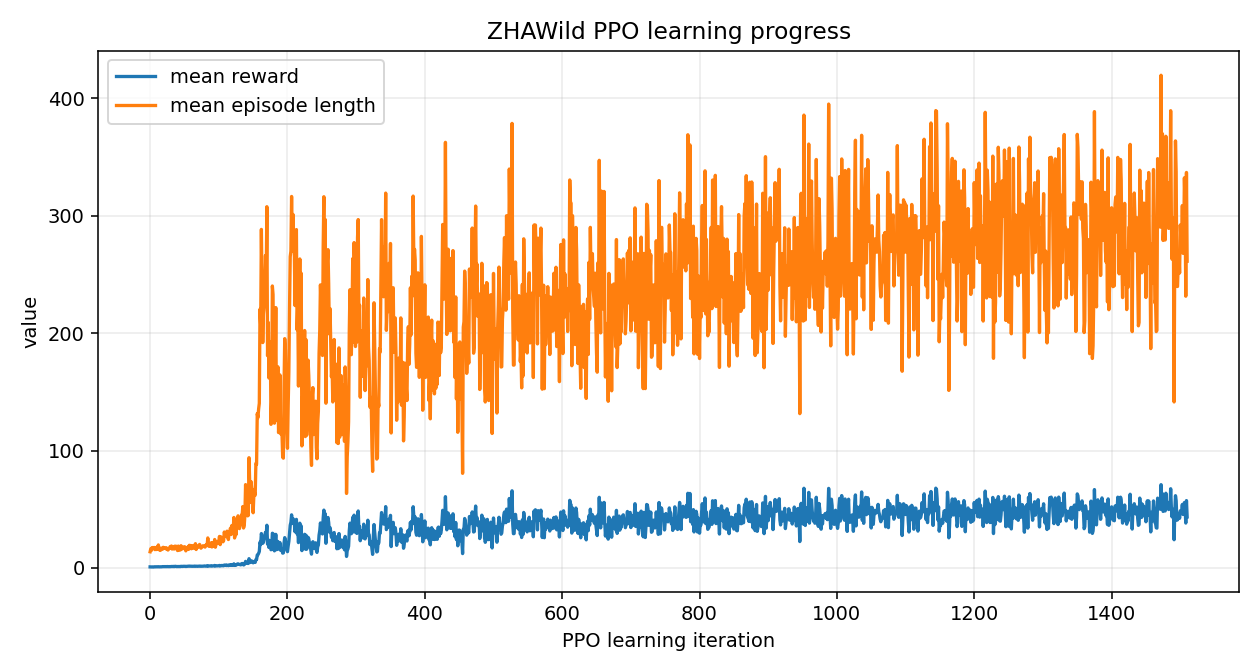
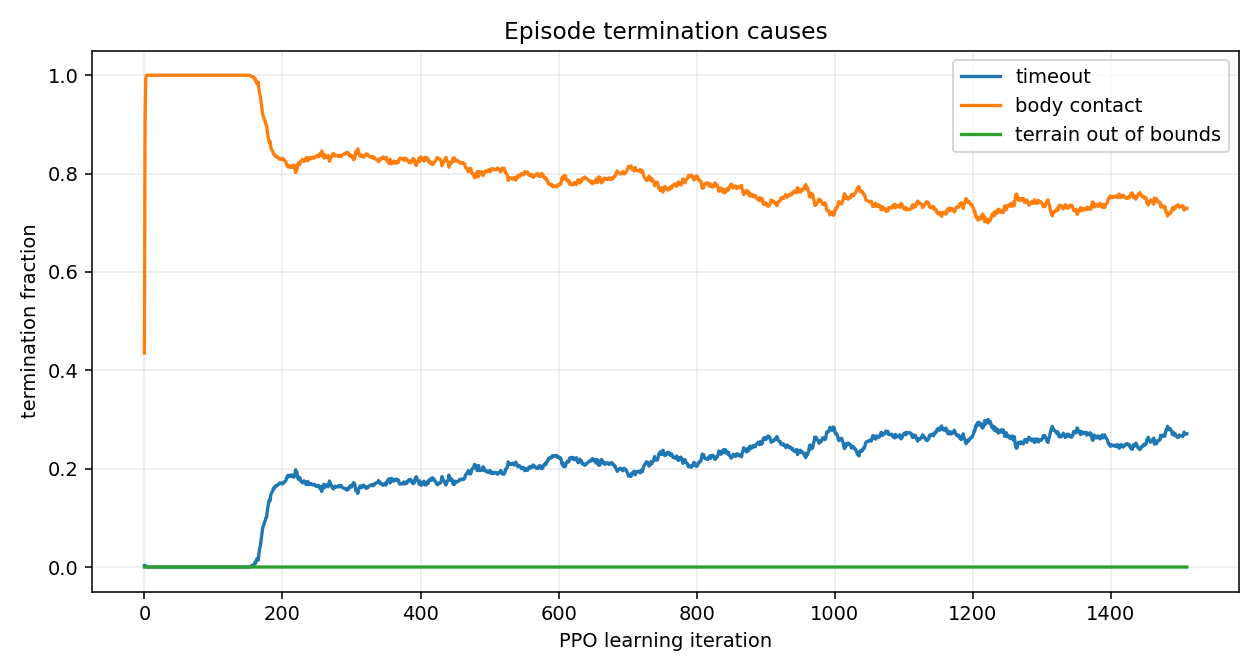
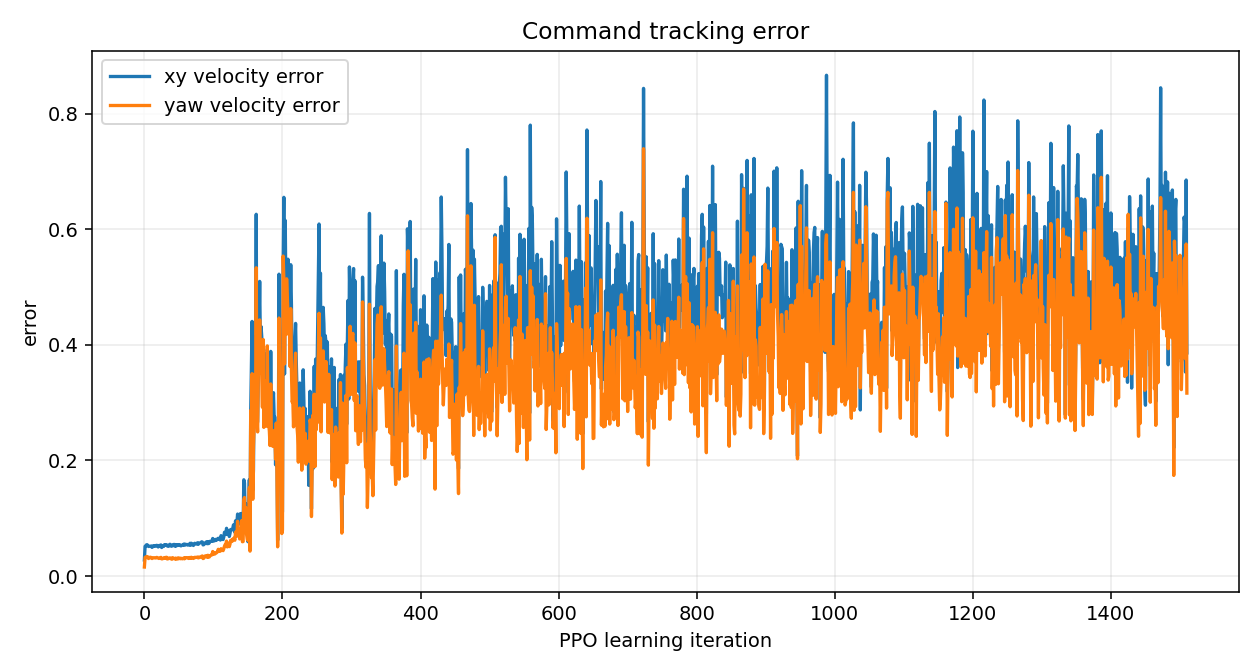
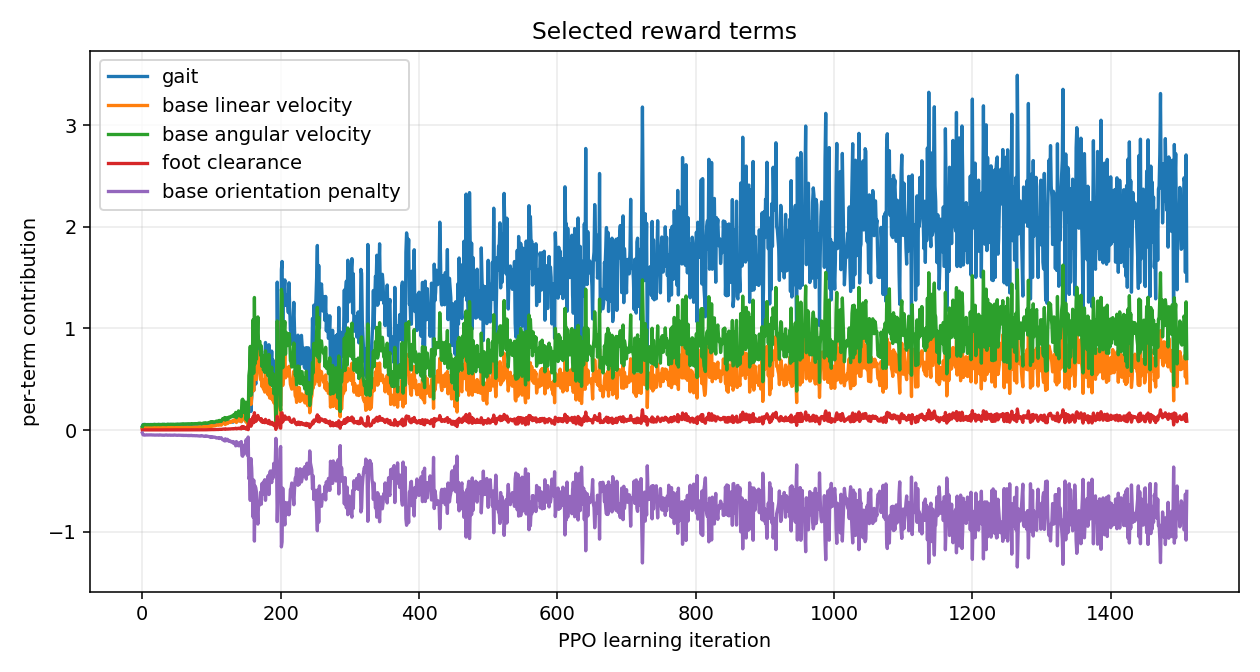
RuntimeError: normal expects all elements of std >= 0.0 when the
action-noise std drifts negative. Patch it in PPO by clamping std to a small positive minimum. Second, NaN drift
in value-function loss after thousands of healthy iterations. Save checkpoints every 50 iterations, and never
replay the last one. Pick a mid-run model that still has good metrics.
10 The kick test
Reward curves do not tell you whether the policy is robust. A kick test does. The training-time push event covers the small disturbances. For a controlled scientific test you want repeatable kicks with known direction and magnitude.
Why keyboard, not mouse
Mouse-click kicks need a viewport raycast. In Isaac Sim 5.1.0 the viewport mouse events are intercepted by the
selection and manipulator system before any custom subscriber sees them. Left-click on the robot just selects
its prim. Keyboard events go through carb.input which is not affected by UI focus and works as long
as the Sim window itself is active.
Bindings
I/J/K/L instead of WASD because WASD is reserved for the viewport fly-mode camera.
Run play_kickable.py custom
C:\Users\jaha\env_isaaclab\Scripts\python.exe ^
  path\to\code\scripts\play_kickable.py ^
  --task=Isaac-Velocity-Flat-ZHAWild-Play-v0 --num_envs=1 --real-time ^
  --checkpoint logs\rsl_rl\zhawild_flat\2026-04-26_17-46-09\model_1500.pt ^
  --kick_speed 2.0
What it looks like recording · 2:25
model_1500.pt · flat-plane playback. The robot has learned that staying on its
feet beats touching the ground with the base. Watch the recovery after lateral kicks: it puts a foot out
sideways, catches the impulse, and resumes tracking the commanded velocity.
What the kicks tell you
| Test | Sequence | Reads off |
|---|---|---|
| Side push | walk forward, press J or L | Recovery time and tracking error after the impulse. |
| Forward shove | standing, press I | Whether it absorbs the shove or topples. |
| Backward shove | standing, press K | Backwards stability. Almost always the weakest direction. |
| Vertical drop | press U, observe landing | Foot-impact handling. |
The implementation pushes via robot.write_root_velocity_to_sim(...), the same call the training-time
push event uses. Disturbances are physically equivalent to what the policy was trained against, just on demand.
★ What I would do differently
- Choose three rotational DoF per leg before anything else. Two-joint legs are a research dead end for walking. Hip abduction is what makes lateral stability possible.
- Treat URDF as the source of truth. Generate USD via Isaac Lab on every load. Never edit USD by hand.
- Name joints in the Spot convention from the first Fusion sketch.
fl_haa,fl_hfe,fl_kfe. Your future regex configs will thank you. - Run a smoke test before a long run. One iteration with one env. If it crashes during Isaac Lab startup, the bug is import-time and a long run will not magically fix it.
- Save checkpoints often, ignore the last one. PPO can drift into NaN late in a run while reward and episode length still look fine. Keep
save_interval=50and pick a mid-run model. - Cross-check rewards against degenerate behaviour before kicking off training. If a crawl satisfies the gait reward, fix the reward, not the training time.
- Build the kick tool early. It takes an hour to write and changes how you evaluate every checkpoint afterwards.
The custom-robot RL pipeline works end to end. URDF in, policy out, kick test for robustness. The remaining work is reward design and physical design. Both of those compound. Both of those are also where the interesting research lives.
A Source files
Every Python file referenced in this post is bundled next to it. Click to read in the browser, right-click to download.
Robot & assets
quadruped_zhawild_v1/quadruped2.urdf— the URDF the viewer above and Isaac Lab both consumequadruped_zhawild_v1/— 11 STL meshes referenced by the URDF
Isaac Lab asset config
code/asset_cfg/zhawild.py—ZHAWILD_CFG: spawn pose, Y-up to Z-up rotation, joint defaults, actuator gains. Goes intoIsaacLab/source/isaaclab_assets/isaaclab_assets/robots/.
Training task package
code/zhawild_task/__init__.py—gym.register(...)forIsaac-Velocity-Flat-ZHAWild-v0and the play variantcode/zhawild_task/flat_env_cfg.py— scene, observations, rewards, terminations, events, terraincode/zhawild_task/agents/rsl_rl_ppo_cfg.py— PPO hyperparameterscode/zhawild_task/mdp/__init__.py— custom reward / observation terms re-exported here
Drop the whole code/zhawild_task/ folder into IsaacLab/source/isaaclab_tasks/isaaclab_tasks/manager_based/locomotion/velocity/config/zhawild/.
Isaac Lab auto-imports task packages on startup, which is when gym.register(...) runs.
Runtime scripts
code/scripts/load_zhawild.py— minimal loader, drops the URDF into a Sim with ground and light. The "does the asset even spawn" smoke test.code/scripts/play_kickable.py— fork ofplay.pywith the keyboard kick controller from Section 10
This page
index.html— the post itself, plus the embedded Three.js URDF viewer in Section 6README.md— repo overview, how to run locally